普通 git rebase
1. rebase 与 merge/pull 的比较
在合并两个分支的时候(无论是远程分支还是本地分支),有两种选择:
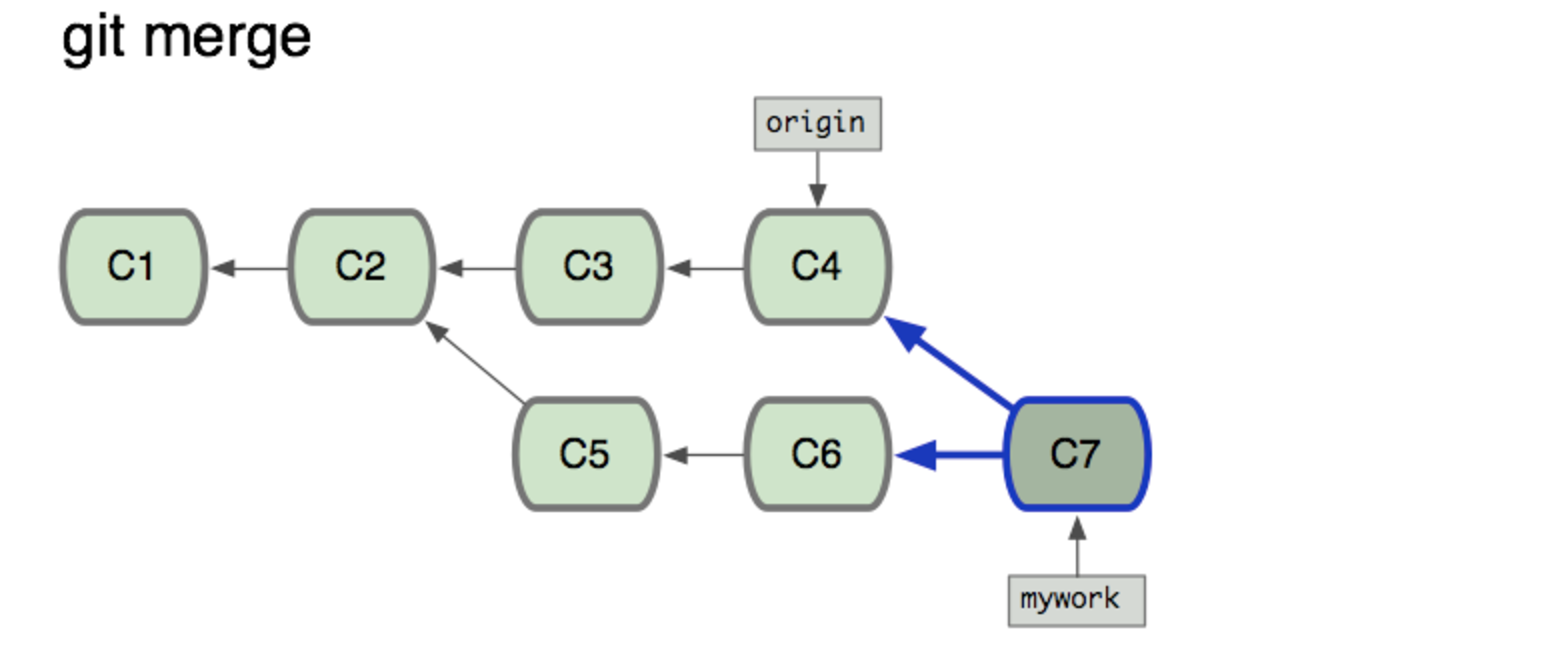
使用 git merge/pull 将目标分支合并到当前分支,它会产生一个新的 commit ,结果看起来就像一个新的"合并的提交"(merge commit):
使用 git rebase ,它会使你的分支历史看起来像没有经过任何合并一样;
他的原理是:
- 把你的"mywork"分支里的每个提交(commit)取消掉,并且把它们临时 保存为补丁(patch)(这些补丁放到".git/rebase"目录中);
- 然后把"mywork"分支更新 到最新的"origin"分支;
- 最后把保存的这些补丁应用到"mywork"分支上;
- 那些老的提交会被丢弃。 如果运行垃圾收集命令, 这些被丢弃的提交就会删除.
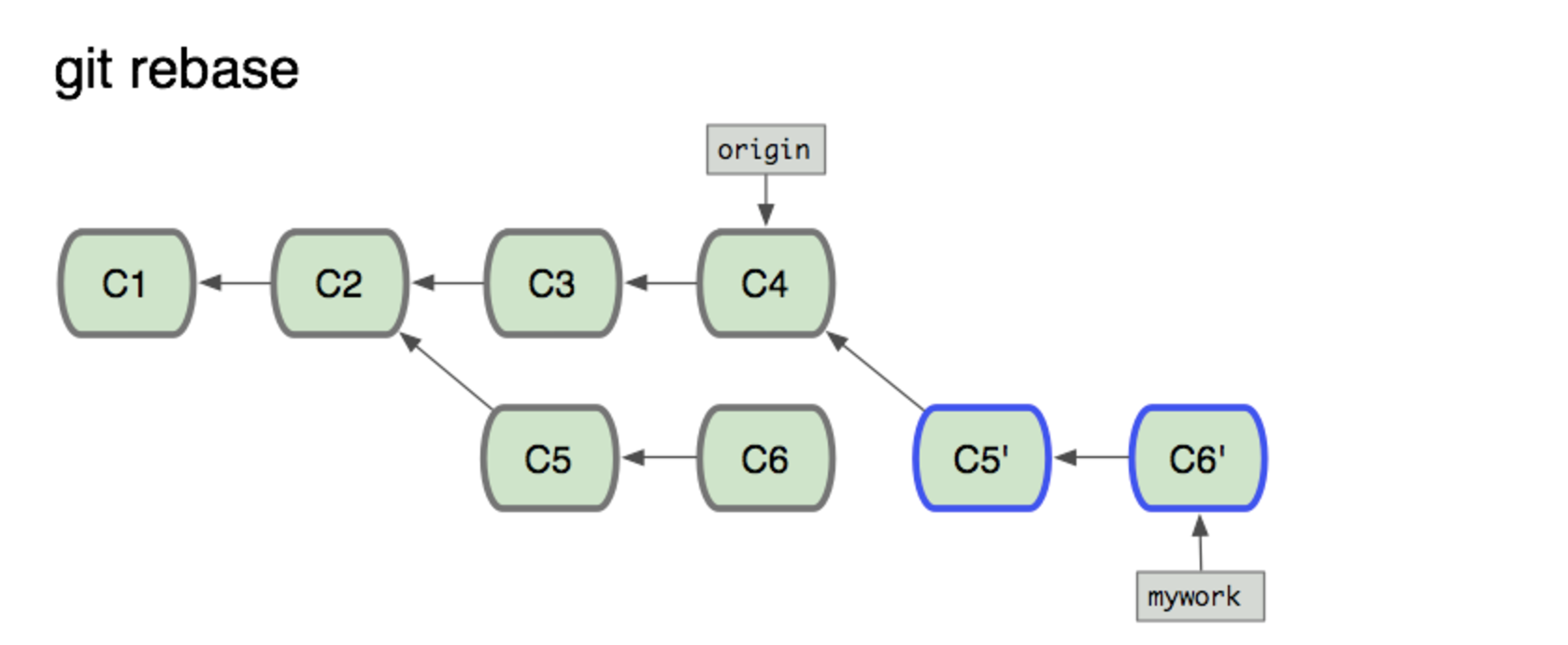

上图这样,就不会有一个多出来的「merge commit」,看起来很干净
2. git rebase 用法
$ git checkout mywork
$ git rebase origin
3. git rebase 后续
- 在rebase的过程中,也许会出现冲突(conflict). 在这种情况,Git会停止rebase并会让你去解决 冲突;在解决完冲突后,用"git-add"命令去更新这些内容的索引(index), 然后,你无需执行 git-commit,只要执行:
$ git rebase --continue 在任何时候,你可以用--abort参数来终止rebase的行动,并且"mywork" 分支会回到rebase开始前的状态。
$ git rebase --abort
交互式 rebase
使用场景:这种方法通常用于在向别处推送提交之前对它们进行重写
1. 确认将要被 rebase 的提交
方法1:定位到远端
查看远程的提交日志
$ git log origin/master
查看那些自最后一次从 origin 仓库拉取或者向 origin 推送之后的所有提交
$ git rebase -i origin/master
# 或者
$ git rebase --interactive origin/master
方法2:通过 commit id 定位
如果要合并1,先用rebase定位到2:
git rebase -i 05cc01f

2. 编辑 rebase 操作
第一步之后会调起预设的编辑器,展示将要 rebase 的提交
pick fc62e55 added file_size
pick 9824bf4 fixed little thing
pick 21d80a5 added number to log
pick 76b9da6 added the apply command
pick c264051 Revert "added file_size" - not implemented correctly

# Rebase f408319..b04dc3d onto f408319
#
# Commands:
#  p, pick = use commit
#  e, edit = use commit, but stop for amending
#  s, squash = use commit, but meld into previous commit
#
# If you remove a line here THAT COMMIT WILL BE LOST.
# However, if you remove everything, the rebase will be aborted.
#
- 每一行提交均由下面构成: (action) (partial-sha) (short commit message)
- 每一行均按照时间 由过去到现在 的顺序排列 commit
我们可以:
调整提交顺序
可以对这些行上下移动从而对提交进行重排序。当你退出编辑器时,git 会按照你指定的顺序去应用提交
更改 action 操作种类 其中 action 的可选项有:
- pick 使用提交(默认)
- edit 使用提交,但是需要暂停更改 commit message
- squash 使用提交,但是把它与时间上靠前的一个提交合并,它会再次调用编辑器,需要我们更新里面将新的合并提交信息
丢弃提交 如果把一行删除,git 会从历史中移除该提交。
3. 举例
合并多个提交 如果 rebase 操作写成这样:
pick   fc62e55 added file_size
squash 9824bf4 fixed little thing
squash 21d80a5 added number to log
squash 76b9da6 added the apply command
squash c264051 Revert "added file_size" - not implemented correctly
那么必须基于以下的提交信息创建一个新的提交信息; 一旦完成对提交信息的编辑并且退出编辑器,这个新的提交及提交信息会被保存起来。
# This is a combination of 5 commits.
# The first commit's message is:
added file_size

# This is the 2nd commit message:

fixed little thing

# This is the 3rd commit message:

added number to log

# This is the 4th commit message:

added the apply command

# This is the 5th commit message:

Revert "added file_size" - not implemented correctly

This reverts commit fc62e5543b195f18391886b9f663d5a7eca38e84.
墙裂建议注释掉原来的commit信息,重新创建一个新的commit提交信息

将一个提交拆分成多个
(看起来这个拆分好像只能到文件级别的,对于文件内部的不同修改来说好像不太能拆分了)
1)提交指定「edit」操作
 pick   fc62e55 added file_size
pick   9824bf4 fixed little thing
edit   21d80a5 added number to log
pick   76b9da6 added the apply command
pick   c264051 Revert "added file_size" - not implemented correctly
2)你会进入到命令行,撤消(revert)该提交,然后创建两个(或者更多个)新提交。假设提交21d80a5修改了两个文件,file1和file2,你想把这两个修改放到不同的提交里。你可以在进入命令行之后进行如下的操作:
$ git reset HEAD^
$ git add file1
$ git commit 'first part of split commit'
$ git add file2
$ git commit 'second part of split commit'
$ git rebase --continue